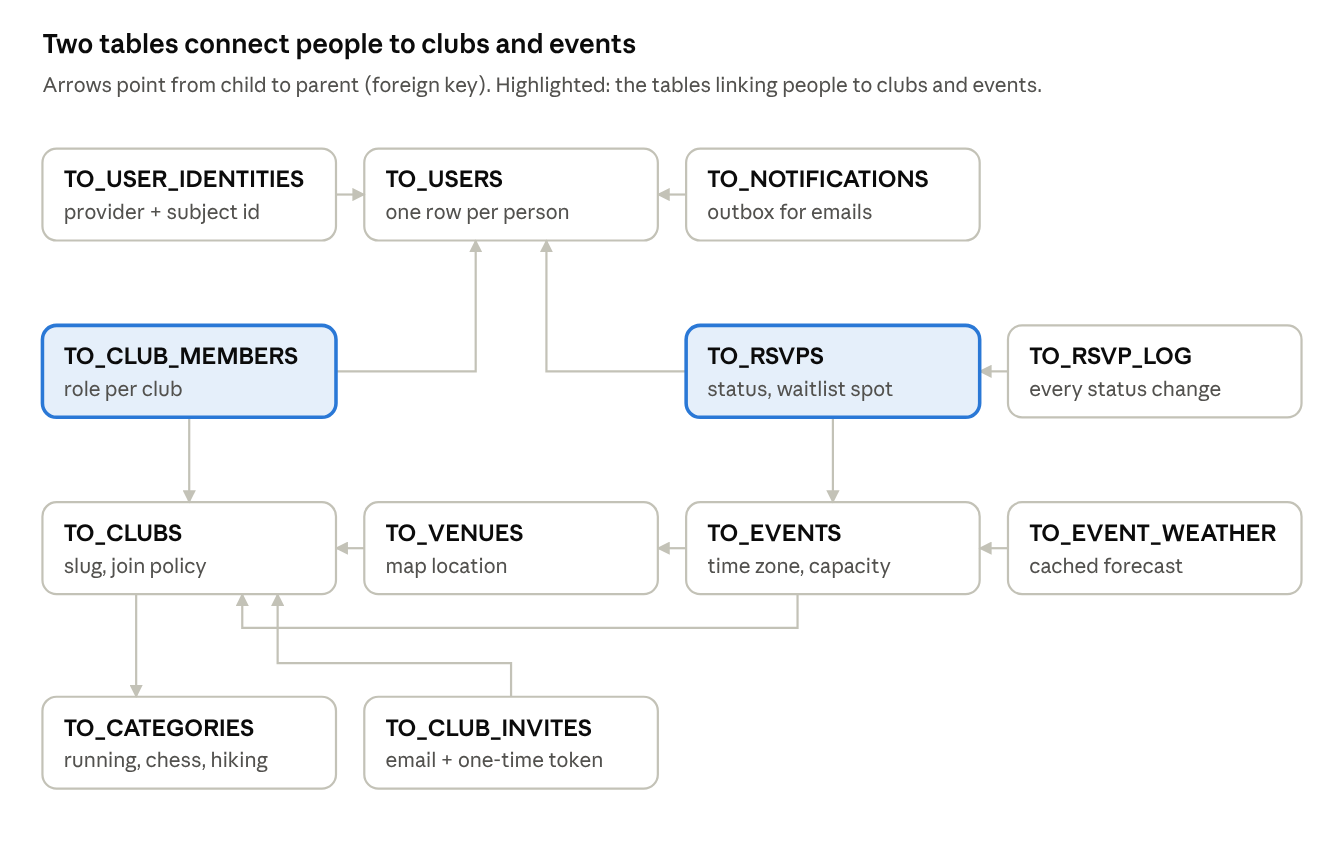
In eleven lessons you build Turnout's twelve tables, one decision at a time. You finish with a schema you could defend in a design review.
How Part 2 works
By the end of Part 2 you have all twelve TO_ tables in your apex.oracle.com workspace, filled with sample data, and you can explain why each table, key and rule exists.
Every lesson follows the same shape, so you always know where you are:
- The question. What the table has to answer, in plain words.
- The decision. What we chose, and the option we didn't.
- The SQL. The part of the schema script this lesson creates.
- Try it. Something to run, and what should happen.
- Check yourself. A question to see if it stuck. The quiz at the end asks ones like it.
Download the scripts from the end of this page, or open each one as you reach its lesson:
| File | Used in | What it does |
|---|---|---|
turnout_quicksql.txt |
Lesson 2.9 | The Quick SQL first draft |
turnout_schema.sql |
Lessons 2.1–2.10 | The hand-finished schema: 12 tables, indexes, triggers |
turnout_seed.sql |
Lesson 2.11 | Sample data: a named cast (8 people, 4 clubs, 9 events, 21 RSVPs) plus about 240 more people, 8 more clubs and a few thousand RSVPs |
Lessons 2.1 to 2.8 each have their own small script, lesson_2_1.sql to lesson_2_8.sql, so you build the schema table by table. Run them in order: later tables point at earlier ones. turnout_schema.sql is all eight in one, for catching up.
Before you start
You need a workspace on apex.oracle.com (Part 0) and nothing else. If you've tried Part 2 before and want a clean start, run turnout_reset.sql first: it removes every table whose name starts with TO_.
Running SQL. You'll use two tools in SQL Workshop:
- SQL Commands runs one statement at a time. Paste it, click Run, and read the result below. Use it for the "Try it" statements, one block at a time.
- SQL Scripts runs a whole file. Click Upload, choose the file, then click the Run icon and Run Now. Use it for the lesson files.
Lesson 2.1 — Keys: surrogate ids and natural uniques
Outcome: create TO_CATEGORIES and explain why it has both an ID and a unique NAME.
The question. How does the database tell one row from another, and how do people?
The decision. Every table gets two kinds of key, because they do different jobs:
| Key | Example | Job | Why not the other one? |
|---|---|---|---|
| Surrogate (primary) key | ID = 4 |
Joins and foreign keys | Never changes, so renaming “Chess” to “Chess & Go” touches one row, not every club |
| Natural unique key | NAME = 'Chess' |
Stops duplicates people would type | An id alone happily allows two rows both called “Chess” |
The ID is an identity column: the database numbers rows itself. generated by default on null lets a script supply an id when it needs to, which helps when copying data between environments.
The SQL.
create table to_categories (
    id          number generated by default on null as identity
                constraint to_categories_pk primary key,
    name        varchar2(60 char)  not null
                constraint to_categories_name_uk unique,
    icon        varchar2(60 char),
    sort_order  number(4) default on null 10 not null,
    is_active   varchar2(1 char) default on null 'Y' not null
                constraint to_categories_is_active_ck check (is_active in ('Y','N'))
    -- plus four audit columns, explained in Lesson 2.8
);
Three habits start here and continue for every table:
- Name every constraint (
to_categories_name_uk). When a rule is broken, the error names the rule instead ofSYS_C0012345. CHARlengths (varchar2(60 char)). Sixty characters means sixty characters, even for “Alvarez” spelled “Álvarez”.is_activeinstead of deleting. Retired categories stay attached to old clubs.
Build it. The SQL above shows the parts that matter. The full statements, with the audit columns from Lesson 2.8, are in lesson_2_1.sql.
- Download the file. In SQL Workshop › SQL Scripts, click Upload, choose the file, and click Upload.
- Click the Run icon next to it, then Run Now.
- The results page should say 0 errors. To check, run this in SQL Workshop › SQL Commands:
select table_name from user_tables where table_name like 'TO\_%' escape '\' order by 1;
It should list TO_CATEGORIES.
Try it. In SQL Commands, run these one at a time:
insert into to_categories (name) values ('Chess');
insert into to_categories (name) values ('Chess');
The first says 1 row(s) inserted. The second fails with ORA-00001: unique constraint (…TO_CATEGORIES_NAME_UK) violated. The error names the rule you broke, because the constraint has a name.
Check yourselfWhy does TO_CATEGORIES need a unique constraint on NAME if it already has a primary key?
The primary key only stops duplicate ids; the unique key stops duplicate names.
Lesson 2.2 — People vs sign-ins
Outcome: create TO_USERS and TO_USER_IDENTITIES, and explain why a person and a sign-in method are different things.
The question. Priya signs up with an emailed code in March and taps “Sign in with Google” in June. Is she one person or two?
The decision. One person, two identities.
TO_USERSholds what belongs to the person: name, email, language, time zone.TO_USER_IDENTITIESholds one row per way they sign in. Each provider gives a permanent id called the subject, and(provider, subject)is unique.- We don't key identities on email, because people change emails and providers can report them differently.
The tempting shortcut is a single table with google_id, microsoft_id and github_id columns. It breaks the day we add a fifth provider, and leaves most columns empty.
The SQL (key parts):
create table to_users (
    id                  number generated by default on null as identity
                        constraint to_users_pk primary key,
    email               varchar2(255 char) not null
                        constraint to_users_email_uk unique,
    display_name        varchar2(100 char) not null,
    preferred_language  varchar2(5 char) default on null 'en' not null
                        constraint to_users_language_ck check (preferred_language in ('en','es')),
    time_zone           varchar2(64 char),
    email_verified_at   timestamp with time zone,
    -- … is_active and audit columns
    constraint to_users_email_lower_ck check (email = lower(email))
);

create table to_user_identities (
    id         number generated by default on null as identity
               constraint to_user_identities_pk primary key,
    user_id    number not null
               constraint to_user_identities_user_fk
               references to_users (id) on delete cascade,
    provider   varchar2(20 char) not null
               constraint to_user_identities_provider_ck
               check (provider in ('EMAIL','GOOGLE','MICROSOFT','GITHUB')),
    subject    varchar2(255 char) not null,
    -- … provider_email, last_login_at, audit columns
    constraint to_user_identities_uk unique (provider, subject)
);
Three details matter here:
- Lower-case email check. Stops “Priya@Example.com” and “priya@example.com” becoming two people. The sign-in code lower-cases before saving.
on delete cascadehere only. A sign-in method means nothing without its person, so it goes when the person goes. Most other foreign keys in Turnout deliberately don't cascade.preferred_languageis there from day one for Part 12, where Turnout speaks Spanish.
Build it. The SQL above shows the parts that matter. The full statements, with the audit columns from Lesson 2.8, are in lesson_2_2.sql.
- Download the file. In SQL Workshop › SQL Scripts, click Upload, choose the file, and click Upload.
- Click the Run icon next to it, then Run Now.
- The results page should say 0 errors. To check, run this in SQL Workshop › SQL Commands:
select table_name from user_tables where table_name like 'TO\_%' escape '\' order by 1;
It should list TO_USERS and TO_USER_IDENTITIES as well.
Try it. Add Priya, then her two ways of signing in:
insert into to_users (email, display_name) values ('priya.raman@example.com', 'Priya Raman');
insert into to_user_identities (user_id, provider, subject)
select id, 'EMAIL', 'priya.raman@example.com' from to_users where email = 'priya.raman@example.com';
insert into to_user_identities (user_id, provider, subject)
select id, 'GOOGLE', '104882913345012345678' from to_users where email = 'priya.raman@example.com';
Now add Grace and try to give her Priya's Google subject:
insert into to_users (email, display_name) values ('grace.kim@example.com', 'Grace Kim');
insert into to_user_identities (user_id, provider, subject)
select id, 'GOOGLE', '104882913345012345678' from to_users where email = 'grace.kim@example.com';
The last one fails on TO_USER_IDENTITIES_UK: one Google account can only belong to one person. Finally try insert into to_users (email, display_name) values ('Grace@Example.com', 'Grace again'); and watch TO_USERS_EMAIL_LOWER_CK stop it.
Check yourselfWhy is (provider, subject) unique instead of email?
The subject never changes and is unique per provider; emails change and can repeat across providers.
Lesson 2.3 — Clubs, categories and URL slugs
Outcome: create TO_CLUBS and explain slugs, settings columns and approval status.
The question. What does a club need to know about itself, and how do people share a link to it?
The decision. A club row carries three kinds of column:
| Kind | Columns | Why |
|---|---|---|
| Identity | name, slug |
The name people read; the slug in shared links like /club/tampa-runners |
| Settings | time_zone, visibility, join_policy |
Each club decides how it runs; Part 6 reads these to decide who can see and join |
| Lifecycle | status |
New clubs start PENDING until a site admin approves them (Part 10) |
The slug gets two rules: unique across all clubs, and a pattern check that allows only lower-case letters, digits and single hyphens. The pattern means a slug is always safe in a URL. Part 8 builds it automatically from the name as the organizer types.
The SQL (key parts):
create table to_clubs (
    id           number generated by default on null as identity
                 constraint to_clubs_pk primary key,
    category_id  number not null
                 constraint to_clubs_category_fk references to_categories (id),
    name         varchar2(100 char) not null,
    slug         varchar2(100 char) not null
                 constraint to_clubs_slug_uk unique
                 constraint to_clubs_slug_ck
                 check (regexp_like(slug, '^[a-z0-9]+(-[a-z0-9]+)*$')),
    time_zone    varchar2(64 char) default on null 'America/New_York' not null,
    visibility   varchar2(20 char) default on null 'PUBLIC' not null
                 constraint to_clubs_visibility_ck check (visibility in ('PUBLIC','PRIVATE')),
    join_policy  varchar2(20 char) default on null 'OPEN' not null
                 constraint to_clubs_join_policy_ck check (join_policy in ('OPEN','APPROVAL','INVITE')),
    status       varchar2(20 char) default on null 'PENDING' not null
                 constraint to_clubs_status_ck check (status in ('PENDING','ACTIVE','SUSPENDED')),
    logo           blob,
    logo_mimetype  varchar2(255 char),
    logo_filename  varchar2(400 char)
    -- … description, city, audit columns
);
Worth explaining:
- Defaults that are safe. A new club is
PENDINGandPUBLICwith anOPENpolicy unless someone decides otherwise. The risky state (live) has to be chosen on purpose. - Logo as three columns. APEX's file upload item fills the file, its type and its name together; Part 7 displays it.
- The foreign key to categories doesn't cascade. Deleting a category that clubs use should fail, which is why categories get
is_activeinstead.
Build it. The SQL above shows the parts that matter. The full statements, with the audit columns from Lesson 2.8, are in lesson_2_3.sql.
- Download the file. In SQL Workshop › SQL Scripts, click Upload, choose the file, and click Upload.
- Click the Run icon next to it, then Run Now.
- The results page should say 0 errors. To check, run this in SQL Workshop › SQL Commands:
select table_name from user_tables where table_name like 'TO\_%' escape '\' order by 1;
It should list TO_CLUBS as well.
Try it. A club needs a category, so add Running first:
insert into to_categories (name) values ('Running');
insert into to_clubs (category_id, name, slug)
select id, 'Tampa Runners', 'Tampa Runners' from to_categories where name = 'Running';
That fails on TO_CLUBS_SLUG_CK: spaces and capitals aren't safe in a web address. Run it again with a safe slug and it works:
insert into to_clubs (category_id, name, slug)
select id, 'Tampa Runners', 'tampa-runners' from to_categories where name = 'Running';
Then check what you didn't type:
select name, slug, status, visibility, join_policy from to_clubs;
The club is PENDING, PUBLIC and OPEN: the safe defaults.
Check yourselfWhy does a new club default to PENDING instead of ACTIVE?
So nothing goes live until a site admin approves it; the safe state is the default.
Lesson 2.4 — Membership as a table
Outcome: create TO_CLUB_MEMBERS and TO_CLUB_INVITES, and enforce “one owner per club” in the database.
The question. Priya organizes Tampa Runners and is a plain member of Bay Chess Club. Where does “organizer” live?
The decision. On the membership, not the person. A people-to-clubs link is many-to-many, so it becomes its own table, and the role is a column on that link. A role column on TO_USERS could only hold one answer for all her clubs.
The table carries three rules:
| Rule | How it's enforced | Why there |
|---|---|---|
| One membership per person per club | Unique key on (club_id, user_id) |
A duplicate row would make “is she an organizer?” ambiguous |
| Active members have a join date | Check: status <> 'ACTIVE' or joined_at is not null |
Pending requests don't have one yet |
| Exactly one owner per club | Function-based unique index | A check constraint can't see other rows; an index can |
The one-owner index is this part's favourite trick:
create unique index to_club_members_one_owner_ux
    on to_club_members (case when role = 'OWNER' then club_id end);
For owners the expression returns the club id; for everyone else it returns NULL. Unique indexes ignore rows where the whole key is NULL, so the rule applies to owners only. Two owners for one club means two equal club ids, and the insert fails.
Invites get their own table because they exist before the invited person has an account. They key on email and a one-time token. The token is emailed, but only its hash is stored, like a password; Part 5 explains the hashing.
create table to_club_invites (
    id           number generated by default on null as identity
                 constraint to_club_invites_pk primary key,
    club_id      number not null
                 constraint to_club_invites_club_fk references to_clubs (id),
    email        varchar2(255 char) not null
                 constraint to_club_invites_email_lower_ck check (email = lower(email)),
    role         varchar2(20 char) default on null 'MEMBER' not null
                 constraint to_club_invites_role_ck check (role in ('ORGANIZER','MEMBER')),
    token_hash   varchar2(64 char) not null
                 constraint to_club_invites_token_uk unique,
    expires_at   timestamp with time zone not null,
    accepted_at  timestamp with time zone
    -- … invited_by_user_id, audit columns
);
Notice invites can't make someone an OWNER. Ownership is handed over inside the app, never by email link.
Build it. The SQL above shows the parts that matter. The full statements, with the audit columns from Lesson 2.8, are in lesson_2_4.sql.
- Download the file. In SQL Workshop › SQL Scripts, click Upload, choose the file, and click Upload.
- Click the Run icon next to it, then Run Now.
- The results page should say 0 errors. To check, run this in SQL Workshop › SQL Commands:
select table_name from user_tables where table_name like 'TO\_%' escape '\' order by 1;
It should list TO_CLUB_MEMBERS and TO_CLUB_INVITES as well.
Try it. Add Marcus and make him the owner:
insert into to_users (email, display_name) values ('marcus.lee@example.com', 'Marcus Lee');
insert into to_club_members (club_id, user_id, role, status, joined_at)
select c.id, u.id, 'OWNER', 'ACTIVE', systimestamp
  from to_clubs c, to_users u
 where c.slug = 'tampa-runners' and u.email = 'marcus.lee@example.com';
Now try Priya as a second owner:
insert into to_club_members (club_id, user_id, role, status, joined_at)
select c.id, u.id, 'OWNER', 'ACTIVE', systimestamp
  from to_clubs c, to_users u
 where c.slug = 'tampa-runners' and u.email = 'priya.raman@example.com';
It fails on TO_CLUB_MEMBERS_ONE_OWNER_UX. Step Marcus down, then run Priya's insert again, and it works:
update to_club_members set role = 'ORGANIZER'
 where user_id = (select id from to_users where email = 'marcus.lee@example.com');
Check yourselfWhy can't a check constraint enforce “one owner per club”?
A check constraint only sees the row being saved; the rule is about other rows in the same club.
Lesson 2.5 — Events and time zones
Outcome: create TO_VENUES and TO_EVENTS, store event times correctly, and put rules that compare columns at table level.
The question. The Saturday Long Run starts at 7:00 a.m. in Tampa. A member travelling in Denver opens the app. What time should they see, and what should the database store?
The decision. Store the exact instant with TIMESTAMP WITH TIME ZONE, and show it in whatever zone the viewer needs.
| Type | Stores | What goes wrong for Turnout |
|---|---|---|
DATE |
Date and time, no zone | “7:00” with no idea whose 7:00; daylight-saving changes shift events by an hour |
TIMESTAMP |
Same, with fractions of a second | Same problem |
TIMESTAMP WITH TIME ZONE |
The instant plus its zone | Nothing: convert to any zone with AT TIME ZONE |
Every column holding an instant ends in _at, so the type is obvious from the name.
Venues are their own table because clubs reuse the same meeting point week after week. Latitude and longitude are plain numbers with range checks, and a table-level check says a point has both halves or neither. Part 7 puts them on a map.
The SQL (key parts of events):
create table to_events (
    id              number generated by default on null as identity
                    constraint to_events_pk primary key,
    club_id         number not null
                    constraint to_events_club_fk references to_clubs (id),
    venue_id        number
                    constraint to_events_venue_fk references to_venues (id),
    title           varchar2(150 char) not null,
    slug            varchar2(150 char) not null,
    starts_at       timestamp with time zone not null,
    ends_at         timestamp with time zone not null,
    capacity        number(6) constraint to_events_capacity_ck check (capacity > 0),
    max_guests      number(2) default on null 0 not null,
    rsvp_opens_at   timestamp with time zone,
    rsvp_closes_at  timestamp with time zone,
    status          varchar2(20 char) default on null 'DRAFT' not null
                    constraint to_events_status_ck
                    check (status in ('DRAFT','PUBLISHED','CANCELLED','COMPLETED')),
    cancel_reason   varchar2(400 char),
    -- … description, audit columns
    constraint to_events_times_ck check (ends_at > starts_at),
    constraint to_events_rsvp_window_ck
        check (rsvp_opens_at is null or rsvp_closes_at is null or rsvp_opens_at < rsvp_closes_at),
    constraint to_events_cancel_reason_ck check (status = 'CANCELLED' or cancel_reason is null),
    constraint to_events_slug_uk unique (club_id, slug)
);
Worth explaining:
- Column rules vs table rules.
capacity > 0is about one column, so it sits on the column. “Ends after it starts” compares two, so it sits at the end of the table. NULLcapacity means unlimited. No magic number like 9999.- Slug unique per club. Two clubs can both have a “coffee-ride”; one club can't have two.
Build it. The SQL above shows the parts that matter. The full statements, with the audit columns from Lesson 2.8, are in lesson_2_5.sql.
- Download the file. In SQL Workshop › SQL Scripts, click Upload, choose the file, and click Upload.
- Click the Run icon next to it, then Run Now.
- The results page should say 0 errors. To check, run this in SQL Workshop › SQL Commands:
select table_name from user_tables where table_name like 'TO\_%' escape '\' order by 1;
It should list TO_VENUES and TO_EVENTS as well.
Try it. Add a run at 7:00 a.m. New York time:
insert into to_events (club_id, title, slug, starts_at, ends_at)
select id, 'Saturday Long Run', 'saturday-long-run',
       timestamp '2026-11-07 07:00:00 America/New_York',
       timestamp '2026-11-07 09:00:00 America/New_York'
  from to_clubs where slug = 'tampa-runners';
Then see the same instant in three places:
select title,
       starts_at,
       starts_at at time zone 'America/Denver' as in_denver,
       starts_at at time zone 'UTC'            as in_utc
  from to_events;
It shows 7:00 in New York, 5:00 in Denver and 12:00 in UTC: one stored instant, three ways to show it. Now try to make the run end before it starts:
update to_events set ends_at = starts_at - interval '1' hour where slug = 'saturday-long-run';
It fails on TO_EVENTS_TIMES_CK.
Check yourselfWhy is ends_at > starts_at a table-level constraint?
It compares two columns of the same row, so it can't belong to either column alone.
Lesson 2.6 — RSVPs as a state machine
Outcome: create TO_RSVPS and TO_RSVP_LOG, and let the database reject impossible states.
The question. When Grace cancels, do we delete her row? And when a spot opens, who gets it?
The decision. An RSVP is never deleted; it moves between five states. Keeping the row keeps history: no-show rates, who was promoted from the waitlist, and an answer when someone says “I was on the list!”
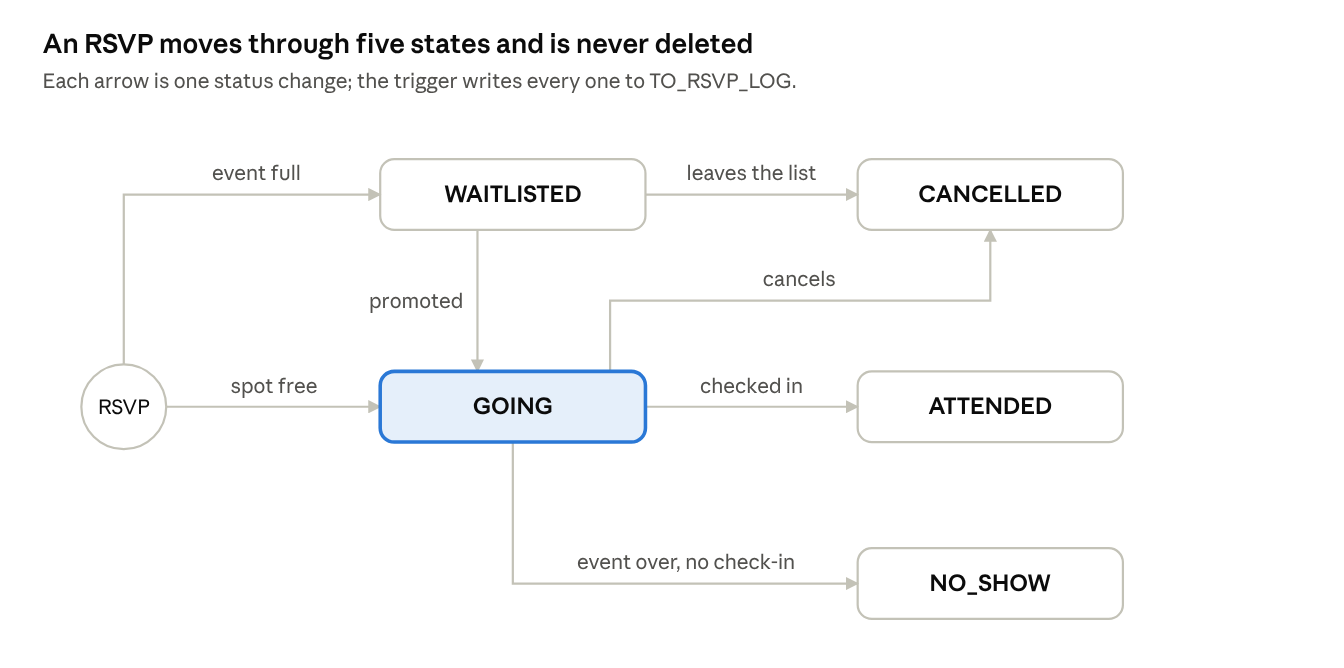
The table enforces what it can see in one row:
| Rule | Constraint |
|---|---|
| One RSVP per person per event | unique (event_id, user_id) |
| A waitlist position exists exactly when waitlisted | to_rsvps_waitlist_ck |
| Only attendees have a check-in time | to_rsvps_checkin_ck |
| Guests can't be negative | to_rsvps_guests_ck |
constraint to_rsvps_waitlist_ck
    check (   (status =  'WAITLISTED' and waitlist_position is not null)
           or (status <> 'WAITLISTED' and waitlist_position is null)),
constraint to_rsvps_checkin_ck
    check (checked_in_at is null or status = 'ATTENDED')
What the table can't enforce, Part 3's TO_RSVP_API does: which moves are allowed (a CANCELLED RSVP can't become ATTENDED), capacity, and promotion order. Ask “can one row prove this?” to decide where a rule goes.
The log. TO_RSVP_LOG gets a row for every status change, written by a trigger:
create or replace trigger to_rsvps_status_log_ai
    after insert or update of status on to_rsvps for each row
begin
    if inserting or :old.status <> :new.status then
        insert into to_rsvp_log (rsvp_id, old_status, new_status)
        values (:new.id, :old.status, :new.status);
    end if;
end;
/
This is one of the few places Turnout uses a trigger for logic, and the lesson says why: an audit log must catch every change, including one made by hand in SQL Commands, so it can't depend on callers remembering to write it.
Build it. The SQL above shows the parts that matter. The full statements, with the audit columns from Lesson 2.8, are in lesson_2_6.sql.
- Download the file. In SQL Workshop › SQL Scripts, click Upload, choose the file, and click Upload.
- Click the Run icon next to it, then Run Now.
- The results page should say 0 errors. To check, run this in SQL Workshop › SQL Commands:
select table_name from user_tables where table_name like 'TO\_%' escape '\' order by 1;
It should list TO_RSVPS and TO_RSVP_LOG as well.
Try it. Put Grace on the waitlist without a position:
insert into to_rsvps (event_id, user_id, status)
select e.id, u.id, 'WAITLISTED'
  from to_events e, to_users u
 where e.slug = 'saturday-long-run' and u.email = 'grace.kim@example.com';
It fails on TO_RSVPS_WAITLIST_CK. Run it again with a position, then promote her:
insert into to_rsvps (event_id, user_id, status, waitlist_position)
select e.id, u.id, 'WAITLISTED', 1
  from to_events e, to_users u
 where e.slug = 'saturday-long-run' and u.email = 'grace.kim@example.com';
update to_rsvps set status = 'GOING', waitlist_position = null;
select old_status, new_status, changed_at from to_rsvp_log order by id;
Two rows: nothing to WAITLISTED, then WAITLISTED to GOING. You never wrote to the log: the trigger did.
Check yourselfWhy are cancelled RSVPs kept instead of deleted?
History: no-show rates, promotion order and disputes all need the old rows.
Lesson 2.7 — Lookup or check constraint? Plus the outbox and the cache
Outcome: choose between a lookup table and a check constraint with a simple test, and create TO_NOTIFICATIONS and TO_EVENT_WEATHER.
The question. Categories got a table, but RSVP status got a check constraint. Why the difference?
The decision. One test: who changes the list, and does code depend on each value?
| Values | Who changes them | Code depends on each value? | Choice |
|---|---|---|---|
| Categories | Site admins, on a screen | No | Lookup table |
| RSVP status | Developers, with a release | Yes: “promote the next WAITLISTED” |
Check constraint |
| Club join policy | Developers | Yes | Check constraint |
| Sign-in provider | Developers, when adding one | Yes | Check constraint |
If adding a value needs new code anyway, a lookup table only adds a join and a way to insert a value the code doesn't understand.
The outbox: TO_NOTIFICATIONS. When an event is cancelled, 40 people need an email. If the email were sent inside the cancel, one slow or failing mail server would make the cancel fail. Instead the cancel writes 40 rows here, and a scheduled job (Part 10) sends them and records the result.
    placeholders  clob
                  constraint to_notifications_placeholders_ck check (placeholders is json),
    status        varchar2(20 char) default on null 'QUEUED' not null
                  constraint to_notifications_status_ck check (status in ('QUEUED','SENT','FAILED')),
    attempts      number(3) default on null 0 not null,
Its index holds only queued rows, so the job's lookup stays fast however much mail has gone out:
create index to_notifications_queued_ix
    on to_notifications (case when status = 'QUEUED' then id end);
The cache: TO_EVENT_WEATHER. Each event shows a forecast from a weather REST service (Part 11). Without a cache, 200 people opening one event page make 200 identical calls. With it, we call once and store the answer with fetched_at.
It's a one-to-one table: one forecast per event, so its primary key is the event's id, not a new one. Deleting an event deletes its forecast (on delete cascade), because a forecast for a deleted event is meaningless.
Build it. The SQL above shows the parts that matter. The full statements, with the audit columns from Lesson 2.8, are in lesson_2_7.sql.
- Download the file. In SQL Workshop › SQL Scripts, click Upload, choose the file, and click Upload.
- Click the Run icon next to it, then Run Now.
- The results page should say 0 errors. To check, run this in SQL Workshop › SQL Commands:
select table_name from user_tables where table_name like 'TO\_%' escape '\' order by 1;
It should list TO_NOTIFICATIONS and TO_EVENT_WEATHER as well: twelve tables in all.
Try it.
insert into to_notifications (user_id, template_static_id, placeholders)
select id, 'EVENT_REMINDER', '{"EVENT_TITLE": "Saturday Long Run"}' from to_users where email = 'grace.kim@example.com';
insert into to_notifications (user_id, template_static_id, placeholders)
select id, 'EVENT_REMINDER', 'not json' from to_users where email = 'grace.kim@example.com';
The first works and is QUEUED without you saying so. The second fails on TO_NOTIFICATIONS_PLACEHOLDERS_CK.
Check yourselfWhy doesn't cancelling an event send the emails directly?
A slow or failing mail server would make the cancel fail; the outbox separates the two.
Lesson 2.8 — Audit columns, defaults and triggers
Outcome: understand the who-and-when columns your tables already have, add the triggers that keep them current, and explain which job belongs to a default and which to a trigger.
The question. A club's name changed overnight. Who changed it, and when?
The decision. Four audit columns on every table people edit: created_at, created_by, updated_at, updated_by. Defaults fill them on insert; a small trigger refreshes the two “updated” columns on every update.
| Job | Tool | Why that tool |
|---|---|---|
| Set created values once | Column default | Runs only when a row is inserted, with no code to maintain |
| Refresh updated values on every change | before update trigger |
Defaults never run on update |
| Know who “who” is | sys_context('APEX$SESSION','APP_USER') |
The person signed in to the app, not the shared database user |
created_at  timestamp with time zone default on null systimestamp not null,
created_by  varchar2(255 char) default on null
            coalesce(sys_context('APEX$SESSION','APP_USER'), user) not null,
create or replace trigger to_clubs_bu
    before update on to_clubs for each row
begin
    :new.updated_at := systimestamp;
    :new.updated_by := coalesce(sys_context('APEX$SESSION','APP_USER'), user);
end;
/
Worth explaining:
- Why
APP_USER. Every APEX page talks to the database as the same schema user. Without the APEX session context, every row would say it was changed by the schema, not by Priya. - Why the fallback to
user. In SQL Commands,APP_USERis your own APEX username, so that's what gets recorded. In a scheduled database job there's no APEX session at all, so the database user is recorded instead of aNULL. default on null. A plain default only applies when the column is left out of the insert;on nullalso applies when someone passesNULLexplicitly, as APEX forms sometimes do.- Triggers for plumbing, packages for rules. Audit columns and the RSVP log are the only triggers in Turnout. Business rules live in Part 3's packages, where they're visible and testable.
- Naming. Every instant ends in
_at; every person ends in_by. You can guess a column's type and meaning from its name.
Build it. The SQL above shows the parts that matter. lesson_2_8.sql adds the seven before update triggers. The columns themselves came with each table in Lessons 2.1 to 2.7.
- Download the file. In SQL Workshop › SQL Scripts, click Upload, choose the file, and click Upload.
- Click the Run icon next to it, then Run Now.
- The results page should say 0 errors. To check, run this in SQL Workshop › SQL Commands:
select trigger_name from user_triggers where table_name like 'TO\_%' escape '\' order by 1;
It should list seven _BU triggers and TO_RSVPS_STATUS_LOG_AI.
Try it.
update to_clubs set name = 'Tampa Runners Club' where slug = 'tampa-runners';
select name, created_at, created_by, updated_at, updated_by from to_clubs where slug = 'tampa-runners';
updated_at is now later than created_at, and updated_by is you. Later, when you edit a club from the app, updated_by will be the signed-in person instead. Put the name back with update to_clubs set name = 'Tampa Runners' where slug = 'tampa-runners';.
Check yourselfWhy can't a column default keep updated_at current?
Defaults run only on insert; updates need the trigger.
Lesson 2.9 — Draft in Quick SQL, finish by hand
Outcome: generate Turnout's tables from Quick SQL shorthand, then list what the generated script gets right and what a person still has to decide.
The question. If APEX can generate tables from a few lines of text, why did we write them by hand?
The decision. Use both. Quick SQL is the fastest way to sketch a model and see it as real SQL; the decisions in Lessons 2.1–2.8 are the part no generator makes for you. In this lesson you paste turnout_quicksql.txt into SQL Workshop › Utilities › Quick SQL and compare.
A taste of the shorthand:
# settings = { "prefix": "to", "PK": "IDENTITY", "semantics": "CHAR", "auditCols": true }

clubs
  category_id /fk categories /nn
  name vc100 /nn
  slug vc100 /nn /unique
  join_policy vc20 /nn /check OPEN, APPROVAL, INVITE /default OPEN
  club_members
    user_id /fk users /nn
    role vc20 /nn /check OWNER, ORGANIZER, MEMBER /default MEMBER
Indenting club_members under clubs makes Quick SQL create the club_id foreign key automatically.
| Decision | Quick SQL draft | Hand-finished schema |
|---|---|---|
| Identity primary keys, table prefix | Yes, from settings | Same |
| Not null, unique, simple checks, defaults | Yes | Same, with named constraints |
| Audit columns | Yes, with its own names and triggers | Our _at / _by names and APP_USER |
| One membership per person per club | No: needs a composite unique key | unique (club_id, user_id) |
| One owner per club | No | Function-based unique index |
| Ends after it starts, RSVP window, waitlist rules | No: they compare columns | Table-level checks |
| Lower-case emails, slug pattern | No | Checks with lower() and regexp_like |
| Weather keyed by its event | No: gets its own id | event_id as primary key |
| Which deletes cascade | No | Only identities and weather |
| JSON columns | Plain clob |
check (… is json) |
Try it. Download turnout_quicksql.txt and open it in a text editor. In SQL Workshop › Utilities › Quick SQL, delete the sample text on the left, paste the file's contents, and look at the SQL that appears on the right (if your version shows a Generate SQL button, click it). Don't run it: you already have the real tables. Find three rows from the table above in the generated SQL, then find two things it did that our script doesn't.
Check yourselfName one rule Quick SQL couldn't generate, and say why.
For example, one owner per club: it involves other rows, which needs a function-based unique index.
Lesson 2.10 — Indexes on foreign keys
Outcome: explain why every foreign key column needs an index, and check the schema for any that don't.
The question. “Show all RSVPs for Saturday Long Run” and “show Priya's clubs” run on every page view. How does the database find those rows without reading the whole table?
The decision. Index every foreign key column, unless an existing index already starts with it. Oracle does not create these automatically: a primary or unique key gets an index, a foreign key doesn't.
An unindexed foreign key costs in two ways:
- Slow lookups. Finding a parent's children means scanning the whole child table. Invisible with 21 RSVPs, painful with 2 million.
- Locking. Deleting a parent row, or changing its key, can lock the whole child table while the database checks for children.
Some foreign keys are already covered because they lead a unique key:
| Foreign key | Covered by |
|---|---|
to_club_members.club_id |
unique (club_id, user_id) |
to_rsvps.event_id |
unique (event_id, user_id) |
to_events.club_id |
unique (club_id, slug) |
to_event_weather.event_id |
Its primary key |
Every other foreign key gets its own index in the schema script, such as to_club_members_user_ix for “Priya's clubs”.
A query worth keeping. Lists any foreign key column with no index that starts with it:
select c.table_name, cc.column_name, c.constraint_name
  from user_constraints c
  join user_cons_columns cc on cc.constraint_name = c.constraint_name
 where c.constraint_type = 'R'
   and c.table_name like 'TO\_%' escape '\'
   and not exists (
         select 1
           from user_ind_columns ic
          where ic.table_name      = cc.table_name
            and ic.column_name     = cc.column_name
            and ic.column_position = cc.position)
 order by c.table_name;
It should return no rows for Turnout.
Try it. Drop one index with drop index to_club_members_user_ix;, run the query above and see TO_CLUB_MEMBERS listed, then put it back with create index to_club_members_user_ix on to_club_members (user_id); and run the query again. In SQL Commands, use Explain on select * from to_club_members where user_id = 1 before and after. With so few rows the plan may still choose a full scan; that's the optimizer correctly picking the cheaper path for a tiny table, and a good moment to talk about why tests need realistic volumes.
Check yourselfName two problems an unindexed foreign key causes.
Slow child lookups, and locking the child table when a parent row is deleted or its key changes.
Lesson 2.11 — Seed realistic sample data
Outcome: load Turnout's sample data with turnout_seed.sql and use it to prove the constraints work.
The question. How do you build and test pages with no members, no events and no RSVPs?
The decision. A re-runnable script with a small, deliberate cast. Every row exists to make a later lesson visible:
| Sample data | Shows up in |
|---|---|
| Priya: organizer of Tampa Runners, member of Bay Chess Club | Part 6 authorization, every lesson |
| Priya with two sign-ins (email and Google) | Part 5 account linking |
| Tuesday Track Intervals: room for 3, two people waitlisted | Part 3 promotion, Part 8 “spots left” |
| Sunrise 5K: already happened, one no-show | Part 7 attendance, Part 10 no-show job |
| Waterfront Spin: cancelled with a reason | Part 7 cancelled-event display |
| Wesley Chapel Readers: waiting for approval | Part 10 approval workflow |
| Sofía and Lucas prefer Spanish | Part 12 translations |
| Dev in Chicago, everyone else in New York | Time zones on the event page |
Four choices make the script useful for years:
- Dates relative to today.
local_time(5, 7)means “7:00 a.m. Tampa time, five days from now”, so events are always upcoming whenever you run it. - Rows found by natural keys. Helpers look up clubs by slug and people by email, so the script reads like sentences and never hard-codes an id. That only works because of Lesson 2.1.
-
Safe to re-run. It deletes sample rows first, children before parents, so a broken lab can always be reset.
-
Volume that obeys the rules. The generated RSVPs fill each capped event to capacity, then start a waitlist, so the data never breaks a constraint from Lessons 2.4–2.6. A dozen rows hide slow queries; a few thousand start to show them, which sets up Lesson 2.10's index check.
Try it. Download turnout_seed.sql and run it in SQL Workshop › SQL Scripts (Upload, Run, Run Now). It replaces the rows you added in the earlier lessons. The script has two parts: the named cast above, then a volume block that adds about 240 more people, 8 more clubs, about 120 events and a few thousand RSVPs, so reports, charts and waitlists look real. It uses dbms_random.seed, so everyone gets the same numbers, and the last queries show the totals, the biggest clubs and RSVPs by status. Then try to break it:
update to_club_members set role = 'OWNER'
 where club_id = (select id from to_clubs where slug = 'tampa-runners')
   and user_id = (select id from to_users where email = 'priya.raman@example.com');
update to_rsvps set status = 'WAITLISTED'
 where event_id = (select id from to_events where slug = 'saturday-long-run')
   and user_id  = (select id from to_users where email = 'grace.kim@example.com');
update to_events set ends_at = starts_at - interval '1' hour where slug = 'saturday-long-run';
Each should fail with a named constraint from this part.
Check yourselfWhy does the seed script use local_time(5, 7) instead of a fixed date?
Fixed dates go stale; relative dates keep events upcoming whenever the script runs.
Downloads for Part 2
Everything this part uses. Each file is plain text you can open in any editor before you run it.
- Part 2 kitturnout-part-2.zipEvery Part 2 script in one zip, with a README
- Lesson scriptslesson_2_1.sqlLessons 2.1 to 2.8, one file each: lesson_2_1.sql to lesson_2_8.sql (also in the kit)
- All tablesturnout_schema.sqlLessons 2.1 to 2.8 in one script, to catch up
- Sample dataturnout_seed.sqlLesson 2.11. Safe to run again
- Quick SQL draftturnout_quicksql.txtLesson 2.9
- Start overturnout_reset.sqlRemoves every TO_ object from your schema
Part 2 quiz
6 questions. Get 4 right to pass. You can retake it as often as you like.