In seven lessons you put every Turnout rule in one place, PL/SQL packages, before any page exists. You finish with an API you can test from SQL Commands.
How Part 3 works
By the end of Part 3 you have seven packages installed and a test script that proves the rules: capacity, waitlists, join policies, roles and invitations. Lessons keep the same shape as Part 2: the question, the decision, the code, try it, check yourself.
Before you start
You need the twelve tables and the sample data from Part 2. To check, run select count(*) from to_users; in SQL Commands: it should be about 250. If you get 0, run turnout_seed.sql again. If you get an error, or your tables are half-built, run turnout_reset.sql first, then download turnout_start_part3.sql and run it in SQL Workshop › SQL Scripts. It builds the tables and loads the sample data in about a minute.
You'll install one to three packages per lesson. Each package is one file, with the spec (what callers can use) and the body (how it works) together.
The order matters, because later packages call earlier ones:
| Order | File | What it owns |
|---|---|---|
| 1 | to_err.sql |
Error codes and the APEX error handler |
| 2 | to_security.sql |
Who is signed in, and what they may do |
| 3 | to_notify_api.sql |
The email outbox |
| 4 | to_user_api.sql |
People and their sign-ins |
| 5 | to_club_api.sql |
Clubs, memberships, invitations |
| 6 | to_rsvp_api.sql |
RSVPs, waitlists, check-in |
| 7 | to_event_api.sql |
An event's life from draft to done |
| then | turnout_api_tests.sql |
Every rule, tested and rolled back |
Behind? turnout_packages.sql installs all seven in one go, in the right order.
Lesson 3.1 — Why a logic layer
Outcome: explain why Turnout's pages never write to tables directly, and name the package each rule lives in.
The question. APEX can build a form that inserts into TO_RSVPS with no code at all. Why not let it?
The decision. Because an RSVP will be made from four places, and “a full event puts you on the waitlist” must hold in all of them.
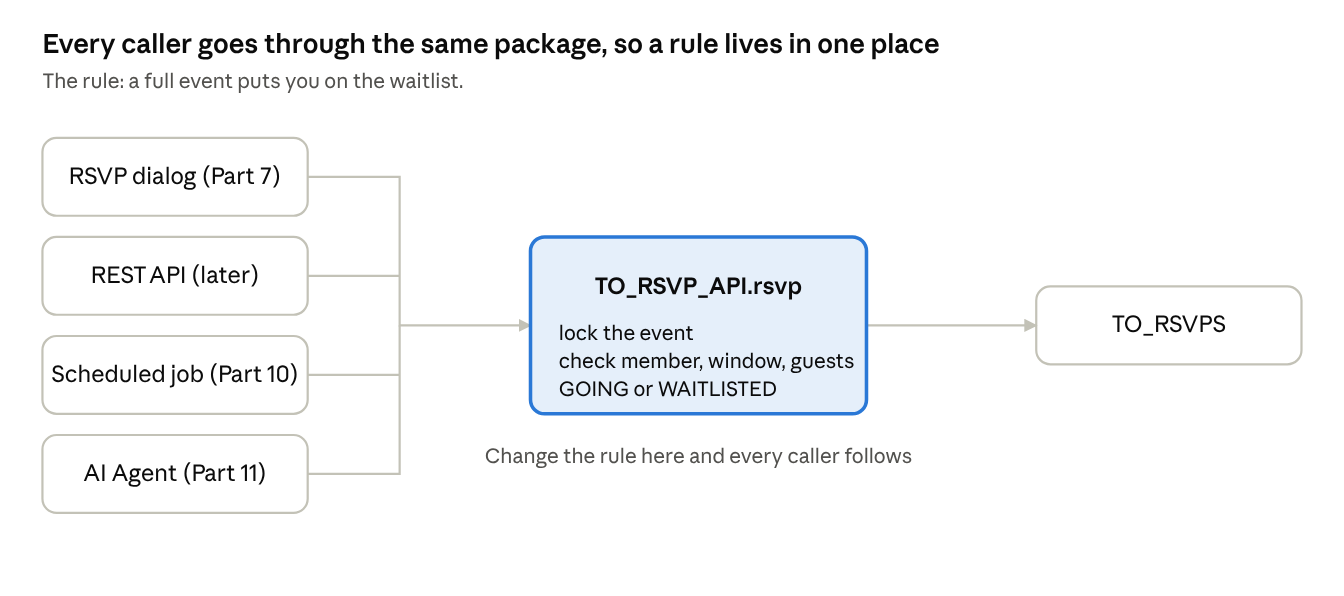
If the RSVP dialog checked capacity itself, the REST API, the reminder job and the AI agent would each need the same check. Sooner or later one would be wrong. With a package, each caller does one thing: call to_rsvp_api.rsvp.
| Belongs in the package | Stays in the page |
|---|---|
| Whether you may RSVP, and to what status | Showing the RSVP button and dialog |
| Locking, capacity, waitlist order | Showing “3 spots left” |
| Who gets notified | Showing a success message |
| Who may do it (checked again) | Hiding buttons people can't use |
The last row matters: hiding a button is for convenience, and the package checks again. Part 6 shows what happens when you skip that.
Try it. Download the Part 3 kit and open the seven package files in a text editor. Read just the comments at the top of each. For each rule in the Part 1 user stories, write down which package owns it. You don't install anything yet.
Check yourselfWhy does the package check permissions when the page already hides the button?
Anyone can send a request without the page; the package is the only place every caller passes through.
Lesson 3.2 — Package anatomy and naming
Outcome: read any Turnout package by its spec alone, and write TO_SECURITY, the package every other one depends on.
The question. What goes in a package's spec, what goes in its body, and how do you name things so code reads like a sentence?
The decision. The spec is a promise to callers; the body is how we keep it.
| Part | Holds | Rule of thumb |
|---|---|---|
| Spec | Public procedures, functions, constants | Only what a caller needs. Comment every item in plain words. |
| Body | Their code, plus private helpers | Anything a caller doesn't need stays here, invisible. |
Turnout's naming, used in every package:
TO_<THING>_APIfor packages that change data;TO_SECURITYandTO_ERRfor shared services.- Verbs for actions (
join_club,cancel_rsvp), nouns for questions (spots_left,current_user_id). p_for parameters,l_for locals,c_for constants,g_for package state. A reader always knows where a name came from.- Constants instead of magic strings:
to_security.c_organizer, not'ORGANIZER'typed in ten places.
TO_SECURITY answers one question everywhere: does this person hold at least this role in this club?
function has_club_role (
    p_club_id  in number,
    p_min_role in varchar2 default c_member,
    p_user_id  in number   default null
) return boolean;
Roles are ranked (MEMBER 1, ORGANIZER 2, OWNER 3), so “at least an organizer” is one comparison. Only ACTIVE memberships count, which is why a removed member loses access the moment their status changes.
Two more details worth pausing on:
current_user_idreadsAPP_USER, which Part 5 sets to the person's email. In SQL Commands,APP_USERis your own APEX username, not a Turnout member's email, socurrent_user_idfinds nobody.act_aslets a script act as a named person.has_club_role_ynreturns'Y'or'N'because Oracle 19c SQL can't use aboolean, and APEX conditions and report columns expect Y or N anyway. Report queries and server-side conditions call this version.
Build it. Install to_err.sql, then to_security.sql: in SQL Workshop › SQL Scripts, Upload each file, then Run it with Run Now, in that order. Then check in SQL Commands:
select object_name, object_type, status
  from user_objects
 where object_type in ('PACKAGE', 'PACKAGE BODY') and object_name like 'TO\_%' escape '\'
 order by object_name, object_type;
You should see TO_ERR and TO_SECURITY, each with a PACKAGE and a PACKAGE BODY row, every one VALID. If one says INVALID, a package it calls is missing: install the files in the order above and run the check again.
Try it. Run this in SQL Commands:
begin
    to_security.act_as('priya.raman@example.com');
    dbms_output.put_line(to_security.has_club_role_yn(
        p_club_id  => (select id from to_clubs where slug = 'tampa-runners'),
        p_min_role => to_security.c_organizer));
    to_security.stop_acting;
end;
/
It fails to compile: a scalar subquery can't be a PL/SQL argument. Fix it by selecting the club id into a variable first. That small error shows the boundary between SQL and PL/SQL better than any explanation:
declare
    l_club number;
begin
    select id into l_club from to_clubs where slug = 'tampa-runners';
    to_security.act_as('priya.raman@example.com');
    dbms_output.put_line(to_security.has_club_role_yn(l_club, to_security.c_organizer));
    to_security.stop_acting;
end;
/
It prints Y: Priya organizes Tampa Runners. Change the slug to bay-chess-club and it prints N, because she's only a member there.
Check yourselfWhy is role_rank in the body and not the spec?
No caller needs it; keeping it private means it can change without touching any caller.
Lesson 3.3 — TO_CLUB_API and join policies
Outcome: implement joining, leaving, roles and invitations so that each club's settings decide what happens.
The question. Tampa Runners lets anyone in, Bay Chess Club approves each member, and Wesley Chapel Readers is invite-only. Where does that difference live?
The decision. In one function, join_club, driven by the club's join_policy column from Lesson 2.3. Pages never decide; they show whatever status comes back.
| Club's policy | join_club returns |
What the page shows |
|---|---|---|
OPEN |
ACTIVE |
“You're in.” |
APPROVAL |
PENDING |
“Request sent. An organizer will approve it.” |
INVITE |
Error: invite-only | “Ask an organizer for an invitation.” |
The other rules in this package, each one sentence:
- Clubs start
PENDINGand the creator becomesOWNER; a site admin approves them. - Organizers approve and remove members; only the owner removes organizers or changes roles.
- The owner can't leave; they hand the club over first with
transfer_ownership. - Rejoining reuses the old row with
MERGE, so there's still one row per person per club. - Invitations store a hash, never the token. The token goes in the email link; a stolen table reveals nothing usable.
transfer_ownership is a nice moment to connect back to Part 2: the one-owner index rejects two owners, so the order of the two updates matters.
-- Order matters: step down first, then promote.
update to_club_members
   set role = to_security.c_organizer
 where club_id = p_club_id and user_id = l_user_id;

update to_club_members
   set role = to_security.c_owner
 where club_id = p_club_id and user_id = p_new_owner_id;
Build it. Install to_notify_api.sql, then to_user_api.sql, then to_club_api.sql: in SQL Workshop › SQL Scripts, Upload each file, then Run it with Run Now, in that order. Then check in SQL Commands:
select object_name, object_type, status
  from user_objects
 where object_type in ('PACKAGE', 'PACKAGE BODY') and object_name like 'TO\_%' escape '\'
 order by object_name, object_type;
You should see TO_NOTIFY_API, TO_USER_API and TO_CLUB_API as well, every one VALID. If one says INVALID, a package it calls is missing: install the files in the order above and run the check again.
Try it. Act as Hannah and ask to join Bay Chess Club. The block ends with rollback, so the sample data stays as it was:
declare
    l_club number;
begin
    select id into l_club from to_clubs where slug = 'bay-chess-club';
    to_security.act_as('hannah.cole@example.com');
    dbms_output.put_line(to_club_api.join_club(l_club));
    to_security.stop_acting;
    rollback;
exception
    when others then
        to_security.stop_acting;
        raise;
end;
/
It prints PENDING: Bay Chess Club approves its members. Change the slug to wesley-chapel-readers and run it again. Now you get "This club isn't open for members yet.", because a club waiting for approval is checked before its join policy. Which check should come first, and why?
Check yourselfWhy does join_club return the status instead of the page computing it from join_policy?
The rule stays in one place; if a fourth policy is added, no page changes.
Lesson 3.4 — TO_RSVP_API: capacity and the last-spot race
Outcome: write rsvp so that two people can never both take the last spot, and explain the lock that prevents it.
The question. Imagine Tuesday Track Intervals with 3 spots and only 2 taken, and two people tap RSVP in the same second. Both sessions count 2 taken, both see room, both insert GOING. Now 4 people are going to a 3-person event. How do we stop it?
The decision. Make everyone RSVPing to the same event take turns, by locking the event row first.
select *
  into l_event
  from to_events
 where id = p_event_id
   for update;
for update locks that one event row until the transaction ends. Grace's session gets the lock, counts 2 taken, inserts GOING and commits. Lucas's session waits a few milliseconds, then counts 3 taken and joins the waitlist.
| Without the lock | With the lock |
|---|---|
| Both count 2 taken at once | Lucas waits for Grace to finish |
Both insert GOING: 4 of 3 |
Grace GOING, Lucas WAITLISTED |
| A constraint can't catch it: each row is valid | Correct every time |
The lock is on the event, not the RSVP rows, so people RSVPing to different events never wait for each other.
After the lock, rsvp checks four things in order and stops at the first that fails:
- The event is
PUBLISHED. - RSVPs are open: after
rsvp_opens_at, beforersvp_closes_at(or the start). - The person is an active member of the club.
- Guests are within
max_guests.
Then it counts spots. Each RSVP takes 1 + guests. If someone already going changes their guest count, their current spots count as theirs, so only the extra guests need room.
Build it. Install to_rsvp_api.sql: in SQL Workshop › SQL Scripts, Upload each file, then Run it with Run Now, in that order. Then check in SQL Commands:
select object_name, object_type, status
  from user_objects
 where object_type in ('PACKAGE', 'PACKAGE BODY') and object_name like 'TO\_%' escape '\'
 order by object_name, object_type;
You should see TO_RSVP_API as well, every one VALID. If one says INVALID, a package it calls is missing: install the files in the order above and run the check again.
Try it. Open two SQL Commands windows (two browser tabs) and untick Autocommit in both. In the first, run the lock and don't commit:
select id from to_events where slug = 'tuesday-track-intervals' for update;
In the second, run the same statement. It waits. Commit (or roll back) the first and watch the second finish. That pause is the race being prevented.
Check yourselfWhy can't a check constraint stop the overbooking?
Each row is valid on its own; the problem is the total across rows, which only a lock serializes.
Lesson 3.5 — Waitlist promotion
Outcome: write promote_waitlist and cancel_rsvp so that a freed spot goes to the right person, every time.
The question. Hannah cancels her spot at Tuesday Track Intervals. Grace is first in line, Lucas second. Who gets the spot, and what happens to everyone else's place?
The decision. The first person in line gets it if they fit. If they don't fit (say they're bringing guests and only one spot opened), promotion stops: nobody behind them jumps the queue. Then the remaining positions close up.
| Person | Before Hannah cancels | After |
|---|---|---|
| Hannah | GOING |
CANCELLED |
| Grace | WAITLISTED, position 1 |
GOING, new ticket, “you're in” email queued |
| Lucas | WAITLISTED, position 2 |
WAITLISTED, position 1 |
The heart of it is a loop that stops at the first person who doesn't fit:
for w in (select id, user_id, guests
            from to_rsvps
           where event_id = p_event_id and status = c_waitlisted
           order by waitlist_position)
loop
    exit when l_capacity is not null and l_taken + 1 + w.guests > l_capacity;

    l_token := new_checkin_token;
    update to_rsvps
       set status = c_going, waitlist_position = null, checkin_token = l_token
     where id = w.id;

    l_taken := l_taken + 1 + w.guests;
    to_notify_api.queue_for_event(w.user_id, p_event_id, to_notify_api.c_waitlist_promoted);
end loop;

renumber_waitlist(p_event_id);
Three things to point out:
- The update sets status and clears position together, because Lesson 2.6's constraint says a position exists exactly when someone is waitlisted. Change one without the other and the database refuses.
- The email is queued, not sent (Lesson 2.7's outbox). If mail is down, Grace still gets her spot.
renumber_waitlistis oneMERGEusingrow_number(), so Lucas's position 2 becomes 1 (and with a longer line, every position moves up) in a single statement.
The same promotion runs when an organizer raises capacity, so TO_EVENT_API.update_event calls it too: one rule, two callers.
Build it. Install to_event_api.sql: in SQL Workshop › SQL Scripts, Upload the file, then Run it with Run Now. Then check in SQL Commands:
select object_name, object_type, status
  from user_objects
 where object_type in ('PACKAGE', 'PACKAGE BODY') and object_name like 'TO\_%' escape '\'
 order by object_name, object_type;
You should see all seven packages, every one VALID. If one says INVALID, a package it calls is missing: install the files in the order above and run the check again.
Try it. Act as Hannah and cancel her spot at Tuesday Track Intervals, then look at the waitlist:
declare
    l_event number;
begin
    select id into l_event from to_events where slug = 'tuesday-track-intervals';
    to_security.act_as('hannah.cole@example.com');
    to_rsvp_api.cancel_rsvp(l_event);
    to_security.stop_acting;
    for r in (select u.display_name, r.status, r.waitlist_position
                from to_rsvps r join to_users u on u.id = r.user_id
               where r.event_id = l_event and r.status in ('GOING', 'WAITLISTED')
               order by r.status, r.waitlist_position)
    loop
        dbms_output.put_line(rpad(r.display_name, 16) || r.status || ' ' || r.waitlist_position);
    end loop;
    rollback;
end;
/
Grace Kim is now GOING, and Lucas Moreno is WAITLISTED 1: the table above, in your own schema.
Check yourselfWhy does promotion stop at the first person who doesn't fit, instead of skipping to someone who does?
Fairness: places in line are kept in order. Skipping would reward people who came later.
Lesson 3.6 — Errors people can read
Outcome: raise errors with clear codes and messages, catch them by name, and make APEX show the message instead of “ORA-20121”.
The question. A member tries to RSVP after RSVPs close. What should they see, and how does a test know which rule failed?
The decision. Every rule failure raises a Turnout code from TO_ERR with a message written for the person using the app.
| Code | Name | Message the person sees |
|---|---|---|
| -20100 | e_not_signed_in |
Please sign in first. |
| -20101 | e_not_authorized |
Only club organizers can do this. |
| -20111 | e_invite_only |
This club is invite-only. Ask an organizer to send you an invitation. |
| -20120 | e_event_not_open |
This event isn't taking RSVPs. |
| -20121 | e_rsvp_window_closed |
RSVPs for this event are closed. |
| -20122 | e_too_many_guests |
You can bring up to 2 guests. |
| -20123 | e_capacity_too_low |
18 spots are already taken, so capacity can't go below 18. |
The full list is in to_err.sql. Each code also has a named exception, so callers read like English:
exception
    when to_err.e_rsvp_window_closed then
        -- show the "RSVPs are closed" banner instead of the button
Good messages follow three habits: say what happened, say what to do if there's something to do, and never blame the person.
The APEX side. to_err.apex_error_handler is set once as the app's error handling function (Shared Components › Application Definition › Error Handling). You'll set it in Part 4, once the app exists; nothing to click now. It does two jobs:
- For Turnout codes (-20100 to -20199), it shows only our message, without the ORA number.
- For constraint errors, it looks for a Text Message named after the constraint. Add a message called
TO_CLUBS_SLUG_UKwith “That web address is taken. Try another.” and the raw error disappears. Part 12 translates these messages into Spanish.
Try it. As Priya, RSVP to the Sunrise 5K, which already happened:
declare
    l_event  number;
    l_status varchar2(20);
begin
    select id into l_event from to_events where slug = 'sunrise-5k';
    to_security.act_as('priya.raman@example.com');
    l_status := to_rsvp_api.rsvp(l_event);
exception
    when others then
        to_security.stop_acting;
        raise;
end;
/
You get ORA-20120: This event isn't taking RSVPs. Which of the four checks caught it? (The first: the event isn't PUBLISHED, it's COMPLETED.) Now catch it by name and print your own line instead:
declare
    l_event  number;
    l_status varchar2(20);
begin
    select id into l_event from to_events where slug = 'sunrise-5k';
    to_security.act_as('priya.raman@example.com');
    l_status := to_rsvp_api.rsvp(l_event);
exception
    when to_err.e_event_not_open then
        dbms_output.put_line('Too late for that one. Try the Saturday Long Run.');
        to_security.stop_acting;
end;
/
Check yourselfWhy keep all error codes in one package?
So no two rules share a number, and every caller can catch any rule by name.
Lesson 3.7 — Testing the API
Outcome: run turnout_api_tests.sql, read its results, and add a test of your own.
The question. We have rules about capacity, waitlists, guests, membership and roles, and no pages yet. How do we know they work, and that they keep working after a change?
The decision. Test the packages directly, as the sample people, before any page exists. Every test acts as someone, does one thing, and checks one result. Then everything is rolled back, so the sample data is never changed.
to_security.act_as('hannah.cole@example.com');
to_rsvp_api.cancel_rsvp(l_track);
ok('Grace, first in line, gets the spot',
   rsvp_status(l_track, 'grace.kim@example.com') = 'GOING');
What the script covers:
| Area | Tests |
|---|---|
| Security | Priya's two roles; she can't cancel a Bay Chess Club event |
| Capacity and waitlist | Marcus waitlisted third; Hannah cancels; Grace promoted with a queued email; everyone moves up |
| Guests | Two guests allowed, three refused |
| Membership | RSVP needs membership; open club joins at once; approval club is PENDING; unapproved club can't be joined; owner can't leave |
| Invitations | Only the token's hash is stored |
| Event lifecycle | New event is a DRAFT with a unique slug; capacity can't drop below spots taken; raising it promotes; cancelling cancels every RSVP |
Build it. Download turnout_api_tests.sql and open it in a text editor. Copy all of it, paste it into SQL Commands, and click Run. The results appear under the editor, one line per test.
The sample events are dated from the day the seed ran, so run turnout_seed.sql (from Part 2) again first if it's more than a day old. A run ends with one line, for example 29 passed, 0 failed. All changes rolled back.
Expected failures are tests too. Most rules are about refusing something, so many tests check that the right error is raised:
l_raised := false;
begin
    l_status := to_rsvp_api.rsvp(l_long_run, p_guests => 3);
exception
    when to_err.e_too_many_guests then l_raised := true;
end;
ok('3 guests is one too many', l_raised);
utPLSQL. On your own database you can install utPLSQL, the standard unit test framework for PL/SQL. The same test becomes an annotated procedure, and utPLSQL handles rollback and reporting:
--%test(3 guests is one too many)
--%throws(-20122)
procedure too_many_guests is
begin
    to_security.act_as('priya.raman@example.com');
    l_status := to_rsvp_api.rsvp(event_id('tampa-runners', 'saturday-long-run'), 3);
end;
The plain script stays the course default, because apex.oracle.com workspaces can't install utPLSQL.
Try it. Write your own test, in the same style. Marcus owns Tampa Runners, so he may make Hannah an organizer. Priya only organizes it, so she may not do the same for Omar:
declare
    l_club  number;
    l_raised boolean := false;
begin
    select id into l_club from to_clubs where slug = 'tampa-runners';

    to_security.act_as('marcus.lee@example.com');
    to_club_api.change_role(l_club, (select id from to_users where email = 'hannah.cole@example.com'), 'ORGANIZER');
    dbms_output.put_line('PASS  an owner can make an organizer');

    to_security.act_as('priya.raman@example.com');
    begin
        to_club_api.change_role(l_club, (select id from to_users where email = 'omar.haddad@example.com'), 'ORGANIZER');
    exception
        when to_err.e_not_authorized then l_raised := true;
    end;
    dbms_output.put_line(case when l_raised then 'PASS' else 'FAIL' end || '  an organizer cannot change roles');

    to_security.stop_acting;
    rollback;
end;
/
It doesn't compile, for the same reason as Lesson 3.2: a select can't be a procedure argument. Fix it by selecting Hannah's and Omar's ids into variables first, run it, and you should see two PASS lines.
Check yourselfWhy does the test script end with rollback?
So it can run any number of times against the same sample data, and never leaves test rows behind.
Downloads for Part 3
Everything this part uses. Each file is plain text you can open in any editor before you run it.
- Start hereturnout_start_part3.sqlThe Part 2 tables and sample data, if you're starting at Part 3
- Part 3 kitturnout-part-3.zipAll seven packages, the tests and a README
- All packagesturnout_packages.sqlThe seven packages in one script, in the right order
- Teststurnout_api_tests.sqlLesson 3.7. Ends with 29 passed
- Start overturnout_reset.sqlRemoves every TO_ object from your schema
Part 3 quiz
5 questions. Get 4 right to pass. You can retake it as often as you like.