Authentication, in Part 5, decided who someone is. Authorization decides what they may do: open the organizer dashboard, approve a club, change someone's role. Turnout checks it in four layers, and every layer exists because the others can be bypassed.
| Layer | Question | Where | Stops |
|---|---|---|---|
| 1 Page | May this person open this page at all? | Authorization scheme on the page | Members wandering into the organizer zone |
| 2 Component | Should this person see this button or menu entry? | Server-side conditions and schemes on components | Confusion: buttons that would only fail |
| 3 Data | Which rows is this person allowed to see? | where clauses and load processes |
An organizer of one club editing another club's event by changing the URL |
| 4 API | Is this person allowed to make this change? | to_security.require_* in every package |
Everything else: a crafted request, a bug in a page, a future REST API |
The golden rule: hiding is courtesy, refusing is security. Layers 1 and 2 make the app pleasant. Layers 3 and 4 make it safe. If you only build one, build layer 4, because it protects the data however it is reached.
Before you start
You need Turnout as it was at the end of Part 5, with email-code sign-in working. If you don't have it, import the Start here app, turnout-app-part-5.zip, from the downloads at the end of this page. If you import it into a schema that already has your tables and cancel at the supporting-objects step, also run part5_login_codes.sql, to_err.sql and to_auth.sql from Part 5, in that order: sign-in needs them.
A note on order. This part sets up the rules for organizer pages, but you build those pages in Part 7. So here you create the schemes, the Admin role and the first admin page. In Part 7, each organizer page gets its scheme the moment you create it.
Lesson 6.1 The four layers
Every request passes the same four checks in order. Each one that says no stops it there, with a message written for the person.
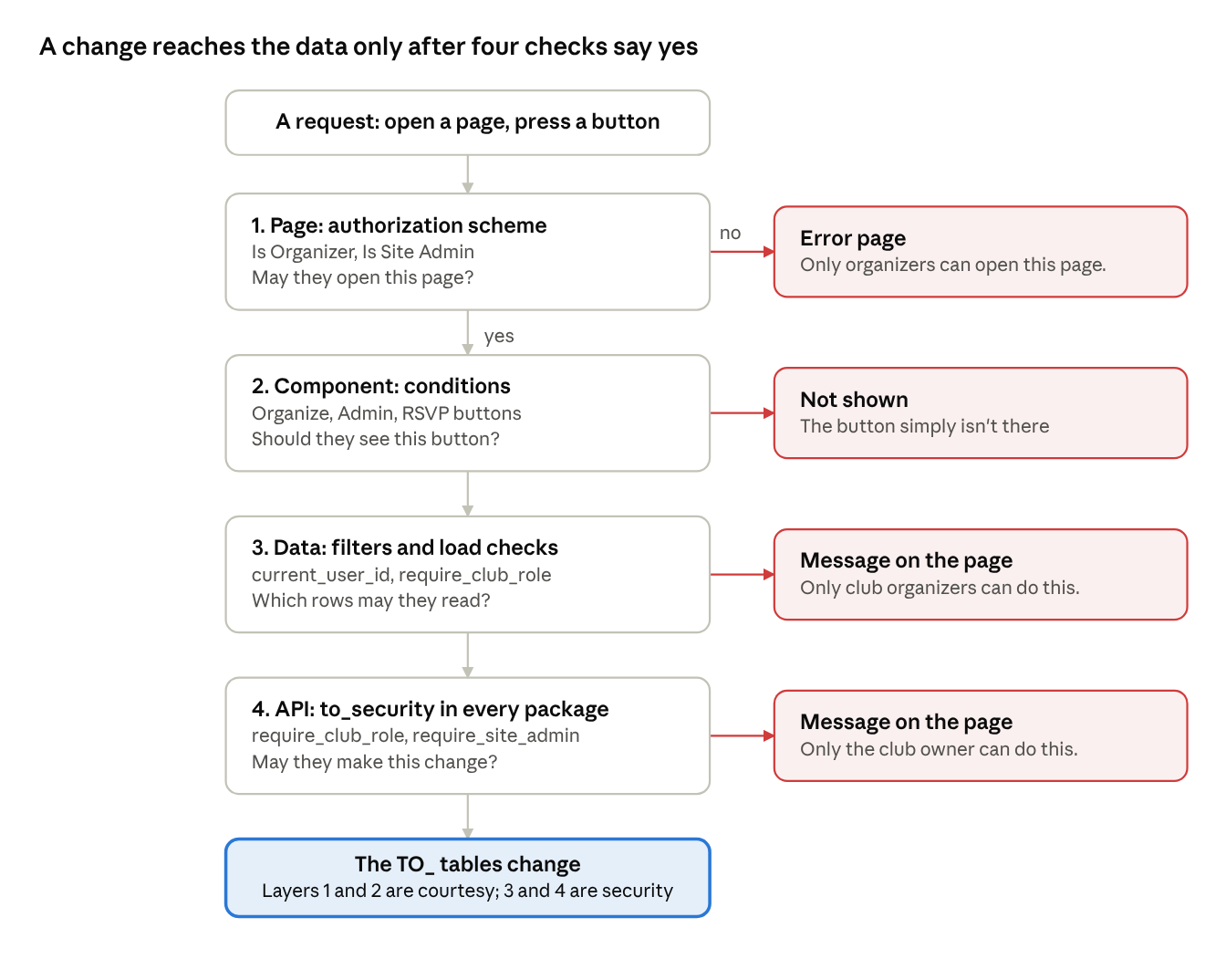
A crafted request can skip layers 1 and 2: it doesn't need your page or your button. It can't skip layers 3 and 4, because they run in the database, whatever sent the request.
Lesson 6.2 Authorization schemes, one per zone
An authorization scheme is a named yes-or-no question APEX asks before showing a page, region, button or menu entry. Turnout has one per zone of the page map (Lesson 1.4, drawn in full in Lesson 7.0):
| Zone | Pages | Scheme | Asks |
|---|---|---|---|
| Public | 1 to 29 | none: the page is Public | Nothing |
| Signed in | 30 to 99 | none: the page requires authentication | Is anyone signed in? APEX checks this itself |
| Organizers | 100 to 199 | Is Organizer | to_security.is_any_organizer |
| Site admins | 200 to 299 | Is Site Admin | to_security.is_site_admin |
authorization is-organizer (
    name: Is Organizer
    type: plSqlFunctionBody
    settings {
        plsqlFunctionBody: return to_security.is_any_organizer;
    }
    error {
        errorMessage: Only club organizers can open this page.
    }
    advanced {
        evaluationType: perPageView
    }
)
Then each organizer page names it: Page › Security › Authorization Scheme: Is Organizer. You'll do that for pages 100 to 140 as you build them in Part 7.
Build it.
- The scheme calls a new function,
to_security.is_any_organizer. Upload and run the updatedto_security.sqlin SQL Workshop › SQL Scripts. It replaces your Part 3 version. - In App Builder: Shared Components › Authorization Schemes › Create, From Scratch, Next.
- Name
Is Organizer, Scheme TypePL/SQL Function Returning Boolean, PL/SQL Function Bodyreturn to_security.is_any_organizer;, Error MessageOnly club organizers can open this page., Validate authorization schemeOnce per page view. Create. - Create a second one the same way: Name
Is Site Admin, function bodyreturn to_security.is_site_admin;, error messageOnly site administrators can open this page., validate Once per session.
Check: the Authorization Schemes list shows both, with Is Organizer evaluated per page view and Is Site Admin per session.
Why "any organizer" and not "organizer of this club"
A scheme takes no parameters. It can't easily know which club page 100 is about, because APEX evaluates it before the page's processes run. So the scheme answers the zone question, "is this person an organizer anywhere?", and the page's load process answers the club question with to_security.require_club_role(:P100_CLUB_ID, to_security.c_organizer). Two checks, each answering what it can answer well.
When the answer is worked out
| Evaluation | Turnout uses it for | Why |
|---|---|---|
| Once per page view | Is Organizer | Priya can be promoted in the middle of a session; the next page should know |
| Once per session | Is Site Admin | Admin roles change rarely, and the check runs on every page with the Admin menu entry |
Never cache a scheme for longer than the answer stays true.
Lesson 6.3 Component conditions: what each person sees
Layer 2 shapes each page to the person looking at it. Two tools do it:
- An authorization scheme on a component, when the question is the same as a zone's. The Admin menu entry uses Is Site Admin, so only site admins see it.
- A server-side condition, when the question depends on this page's data. The Organize button on page 10 asks about this club:
to_security.has_club_role_yn(:P10_CLUB_ID, to_security.c_organizer) = 'Y'
| Component | Shown to | Condition |
|---|---|---|
| My events, My clubs (menu) | Anyone signed in | User is authenticated |
| Admin (menu) | Site admins | Scheme: Is Site Admin |
| Organize button on page 10 (after Part 7) | Organizers of this club | has_club_role_yn(...) |
| Join this club (page 10) | Signed-in people who aren't members | :P10_MY_STATUS is empty or REMOVED |
| RSVP (page 20) | Signed-in people not yet going or waiting | :P20_MY_STATUS |
| Sign in to RSVP (page 20) | Visitors | User is the public user |
Use the _yn function in conditions. has_club_role returns a PL/SQL BOOLEAN. It works in a PL/SQL expression, but the _yn version also works in SQL, so one function serves conditions, report columns and queries alike.
Lesson 6.4 Data rules: filter by person and club
Layer 3 decides which rows a page may read. Two habits cover every page in Turnout:
- Personal pages filter by the person. My events, My ticket, My clubs and Profile all have
where ... user_id = to_security.current_user_id. There is no item to tamper with, so there is nothing to protect. - Club pages check the club when they load. Pages 100 to 140 start with
to_security.require_club_rolefor the club in their URL. Priya openingP100_CLUB_IDfor Bay Chess Club, where she is only a member, gets "Only club organizers can do this."
The checksum on every URL (Arguments Must Have Checksum) is a third, cheaper fence: it stops editing ids by hand. But a link that was valid yesterday is still valid after someone is demoted, so the load check stays.
APEX 26.2 also adds Deep Data Security, which moves rules like these into the database so every query is filtered automatically. Lesson 13.3 compares it with this approach.
Lesson 6.5 Site admins and the Club approvals page
Club roles live in Turnout's own tables. Site-wide roles, like "runs Turnout itself", use APEX's built-in Access Control instead: it already has screens for assigning roles, and apex_acl to check them from PL/SQL.
- The app defines one role, Administrator (
shared-components/acl-roles.apx). - Assign it: Shared Components › Application Access Control › Add User Role Assignment. User name:
priya.raman@example.com. Role: Administrator. to_security.is_site_adminasksapex_acl.has_user_role(p_user_name => APP_USER, p_role_static_id => 'ADMINISTRATOR').
Because Part 5 made APP_USER the person's email whatever way they signed in, one assignment covers email codes and Google alike.
Build it.
- Shared Components › Application Access Control. Under Roles, click Add Role: Name
Administrator, Static IDADMINISTRATOR. Create. - Under User Role Assignments, click Add User Role Assignment. User Name
priya.raman@example.com, check Administrator. Create. (APEX may show the name in capitals; that's fine.)
Page 200: Club approvals
New clubs start PENDING. Page 200 lists them with who asked, and has Approve and Turn down buttons that call to_club_api.approve_club and suspend_club. Both procedures begin with to_security.require_site_admin, so even a hand-crafted request from someone else is refused. Approving also queues a "your club is live" email to the owner through the outbox (Part 10 sends it).
The page carries Is Site Admin, and so does the Admin menu entry: the entry is hidden from everyone who couldn't open the page anyway.
Build it.
- Create Page › Blank Page, number
200, nameClub Approvals. Under Navigation, switch Use Navigation on and create a New Navigation Menu Entry calledAdmin. Create. - Page properties: Alias
CLUB-APPROVALS, TitleClub approvals, Security › Authorization SchemeIs Site Admin, Page Access ProtectionArguments Must Have Checksum. - Right-click Body, Create Region, and set Layout › Slot to Breadcrumb Bar (a new page only lists the slots it uses). Make it Static Content with template Hero: Title
Club approvals, Source › HTML CodeNew clubs wait here until a site admin approves them. Approved public clubs appear on Clubs straight away. - In Body, a Classic Report region, Name and Title
Waiting for approval, with this query. Under Attributes › Messages, set When No Data Found toNothing waiting.
select c.name,
       cat.name as category,
       c.city,
       u.display_name || ' (' || u.email || ')' as owner,
       c.description,
       c.created_at
  from to_clubs c
  join to_categories cat on cat.id = c.category_id
  left join to_club_members m on m.club_id = c.id and m.role = 'OWNER'
  left join to_users u        on u.id = m.user_id
 where c.status = 'PENDING'
 order by c.created_at
- Below it, a Static Content region Decide. In it, a Select List item
P200_CLUB_ID, LabelClub, Value Required on, templateRequired - Above, with List of Values typeSQL Query, Display Null Value on, Null Display ValueChoose a club:
select name || ', ' || city as d, id as r
  from to_clubs
 where status = 'PENDING'
 order by created_at
- Two buttons in the Decide region, position Edit:
APPROVE, labelApprove, Hot. AndSUSPEND, labelTurn down, with Requires Confirmation on and the messageTurn this club down? It stays hidden and its owner can't add events. - Two processes. Approve club, When Button Pressed
APPROVE, Success MessageApproved. The club is live.:
to_club_api.approve_club(:P200_CLUB_ID);
Turn down club, When Button Pressed SUSPEND, Success Message Turned down.:
to_club_api.suspend_club(:P200_CLUB_ID);
- A branch After Processing to page
200, Clear Cache200, Include Process Success Message on. - Shared Components › Navigation Menu, open the Admin entry, and set Authorization Scheme to
Is Site Admin.
Check: sign in as Priya. Admin is in the menu, and the page lists Wesley Chapel Readers. Sign out and sign in as Grace: no Admin entry. Type the page's address by hand and you get "Only site administrators can open this page."
Lesson 6.6 What people see when they're refused
A refusal should say what happened and what to do, never show an ORA- number.
| Refused by | Person sees | Written in |
|---|---|---|
| Page scheme | "Only club organizers can open this page." on an error page | The scheme's Error Message |
| Hidden component | Nothing: the button isn't there | |
| Load check or API | "Only club organizers can do this." at the top of the page | to_security.require_club_role, shown by the error handler from Lesson 3.6 |
| Business rule | "Only the club owner can remove an organizer." | to_club_api.remove_member |
Every message names the rule, not the person: "only the owner can", not "you can't". It reads as information, and it tells them who to ask.
Lesson 6.7 Testing permissions as three people
Permissions are easy to get wrong in the direction nobody notices: someone can do too much. Test each layer as someone who should be refused.
| As | Try | Expect | Layer |
|---|---|---|---|
| A visitor | Open My events from a bookmark | The sign-in page | Page requires authentication |
| Hannah (a member, not an organizer), after Part 7 | Open page 100 for Tampa Runners | "Only club organizers can open this page." | 1 Page scheme |
| Priya (organizer of Tampa Runners), after Part 7 | Look at Bay Chess Club's page | No Organize button | 2 Component |
| Priya, after Part 7 | Open page 100 with Bay Chess Club's id | "Only club organizers can do this." | 3 Data |
| Priya, after Part 7 | Change Marcus, the owner, to Member on page 110 | "Only the club owner can do this." | 4 API |
| Priya, after you assign Administrator | Admin › approve Wesley Chapel Readers | It leaves the waiting list. It's a private club, so it doesn't appear on Clubs | All four |
The API tests from Part 3 already cover layer 4 without a browser: turnout_api_tests.sql proves Priya can't cancel a Bay Chess Club event.
Checkpoint
Every page in Turnout now belongs to a zone with a scheme, every button that matters has a condition, every page reads only the rows it may, and every change goes through an API that checks again.
| File | Change |
|---|---|
to_security.sql |
Has is_any_organizer (since Part 3). Run it again only if yours is older |
apexlang/turnout/shared-components/acl-roles.apx |
New: the Administrator role |
apexlang/turnout/shared-components/authorizations.apx |
Is Organizer, and Is Site Admin with an evaluation type |
apexlang/turnout/pages/p00100 to p00140 |
Authorization Scheme: Is Organizer, set as you build them in Part 7 |
apexlang/turnout/pages/p00200-club-approvals.apx |
New: Club approvals |
apexlang/turnout/shared-components/lists.apx |
Admin menu entry for site admins |
Exercises
- Add page 210, Categories, for site admins: an Interactive Grid on
TO_CATEGORIESwith Is Site Admin. - Give the Members page a second scheme, Is Owner, and use it to hide the Role column from organizers who aren't owners.
- Write a test in
turnout_api_tests.sqlproving an organizer can't approve a club. - Stretch: log every refusal from
to_securityto a table, and show the last 50 on an admin page.
Downloads for Part 6
Everything this part uses. Each file is plain text you can open in any editor before you run it.
- Start hereturnout-app-part-5.zipTurnout at the end of Part 5, if you're starting at Part 6
- Finishedturnout-app-part-6.zipTurnout at the end of Part 6. Import it to compare, or to catch up
- to securityto_security.sqlLesson 6.2: adds is_any_organizer
- Part 6 kitturnout-part-6.zipEverything above in one zip, with a README
- Start overturnout_reset.sqlRemoves every TO_ object from your schema
Part 6 quiz
5 questions. Get 4 right to pass. You can retake it as often as you like.